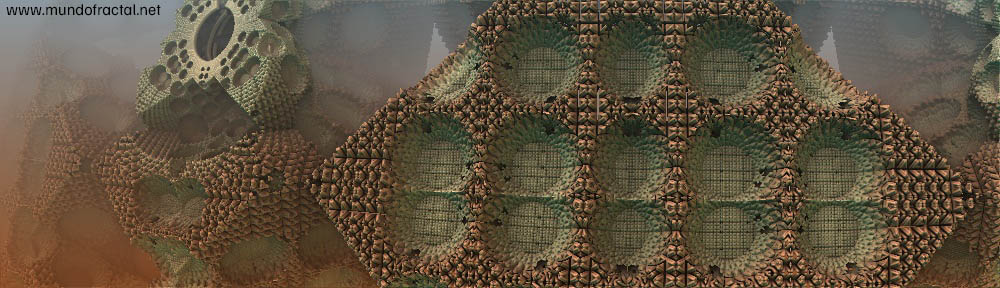
My second attempt with the Mandelbulb. I’m not really interested in this thing. This one looks like a cross of a broccoli and Macchu Picchu which is as awful as it gets.

Macchubrocco
My second attempt with the Mandelbulb. I’m not really interested in this thing. This one looks like a cross of a broccoli and Macchu Picchu which is as awful as it gets.

Macchubrocco
Tags: awful, broccoli, examples, fractals, Fractint, fugly, image, Macchu Picchu, Mandelbulb, Ultra Fractal
While doing some tweaks in old images I noticed that some images don’t really fit that well if just centered, mostly some spirals and images that have a certain detail that is the main “subject” of the image. If they are just moved a few bits to the side, they look more interesting. I’ve figured this by myself I guess since I never had any formal art training, and my older images seem to suffer more from this “problem”. It seems that I just did the fractal image and wherever it started, it stayed, I never tried to make it look better in terms of proportions or positioning. A small rotation the most, and that was it. But why this happens to the images? Why some appear to look better if their subjects are in certain places, mostly off-center? It can be sort of explained by the Rule of Thirds and also by the Golden Ratio.
The Rule of Thirds is well known in the photography world, and it’s not exactly a rule that you must follow all the time, it’s more like a guideline (same applies to the Golden Ratio). It says that your main subject(s) of your pictures/paintings etc. will look better if they are located 1/3 away from the image’s edges (I’d prefer to say though that the images might look better instead of will look better). It’s not a must follow rule, but it helps in some particular images.
And how do I know where is this specific location? Read the rest of this entry »
Tags: art, artists, digital art, Divine Proportion, examples, Fibonacci, Fibonacci number, Golden Mean, Golden Ratio, mathematics, Phi, proportion, Rule of Thirds, simmetry, spirals
I think I’ll stay with this layout (Arclite) for a while. Still needs some small fixes but this seems to be a good one for a while. Some galleries might look a little messed up because of the width of the main content, I’ll fix that later. It ended up still keeping some blue, after all. Other colours didn’t really mixed well with the fonts, blue seems a more “natural” colour for the web. Maybe just a few tweaks in the font sizes and that’s it. Also there are options for custom logos in the header, but it’s not in the plans as I’ve said in the previous post.
Edit: as Michael Jackson would say, this is it. It’s working, looks OK, all it needs now is maybe a very few adjustments. All settings were mostly kept, which is nice. And the 16 images format for the gallery works.
Tags: colours, examples, gallery, general information, intarwebs, layout, WordPress
As most of the hard work is finally finished (the galleries themselves), it’s time to make some customizations for real. I’ll be changing this theme soon. It’s not that ugly, it loads fast and all that, but I’m just not very fond of blue (and it has a lot of blue…) and things seems to be too big font-wise so to speak. Also, some basic features don’t seem to work nicely with this theme like some basic things in the pages – submenus for custom pages, which can be an important part in the future, to use these in a separate link in some sort of a “menu” for easy access to the galleries and even pagination. At the same time that it’s basic enough to load fast and have a clean appearance, it’s too simple to make some basic things work. Also it’s a bit too thin, text gets too extended when in fact it’s not that long. It’s thin in its overall width, but the fonts are way bigger. Not very proportional, and I’m not in the mood of customizing CSS right now.
I’ve tried some new themes, and those that I liked still need some small fixings (easy stuff, basically) before being used right away, while this I’ll be also looking for other options. I might use one from these pre-installed after all, but if I find something else that fits better with my tastes and the overall look and theme of the site, it will be replaced. I’ll probably not be using any theme with some sort of a big “logo” or “top banner” design, as it would require extra customization as in making a specific fractal just for that, making smaller banners based on that for links etc. etc.. It might work, but it’s not really something that is needed. I could (re)use a logo/banner I did for fractalland.com, but as it has some transparency over some odd background colour, probably it won’t fit. Also if a theme doesn’t work with a plugin that I’ll be using that will be a part of the whole layout and that can’t or won’t be disabled – like the Font Burner plugin – the theme will not be used.
Tags: examples, general information, layout, WordPress
Jul 17
Posted by mfadmin in General, Images | No Comments
Pretty isn’t it? But guess what was my involvement in all this? A few clicks. To be precise, just 3. One to open Apophysis, other in the menu to select “Scripts”, and the last one to select a script. (OK, there was another one, to run the script, it’s 4 clicks actually, sorry!). There were a few more clicks required to render the images, but these aren’t related to the actual creation of the images. And these images look quite similar not only to each other but to most of these so-popular “amazing-whatever” batches of fractal “art” spread all over the internet. So sad.
Tags: annoyances, Apophysis, art, artists, digital art, examples, fractal softwares, fractals, freeware, fugly, image, inspiration, intarwebs, rant, sarcasm, stupid people, wallpaper, watermark
Arclite theme by digitalnature | powered by WordPress
Mundo Fractal is Digg proof thanks to caching by WP Super Cache